
Editing Contacts
Keeping your contact information accurate and up to date is essential for effective communication and campaign targeting. Convers8 makes it easy to edit individual contact details whenever necessary.
How to Edit a Contact
Step 1: Go to the Contacts Section
From your dashboard, navigate to the Contacts section.
Step 2: Locate the Contact
Use the search bar or filters to find the contact you want to update.
Click View to open that contact’s details page.
Step 3: Edit Contact Information
Click the Edit button to enable editing.
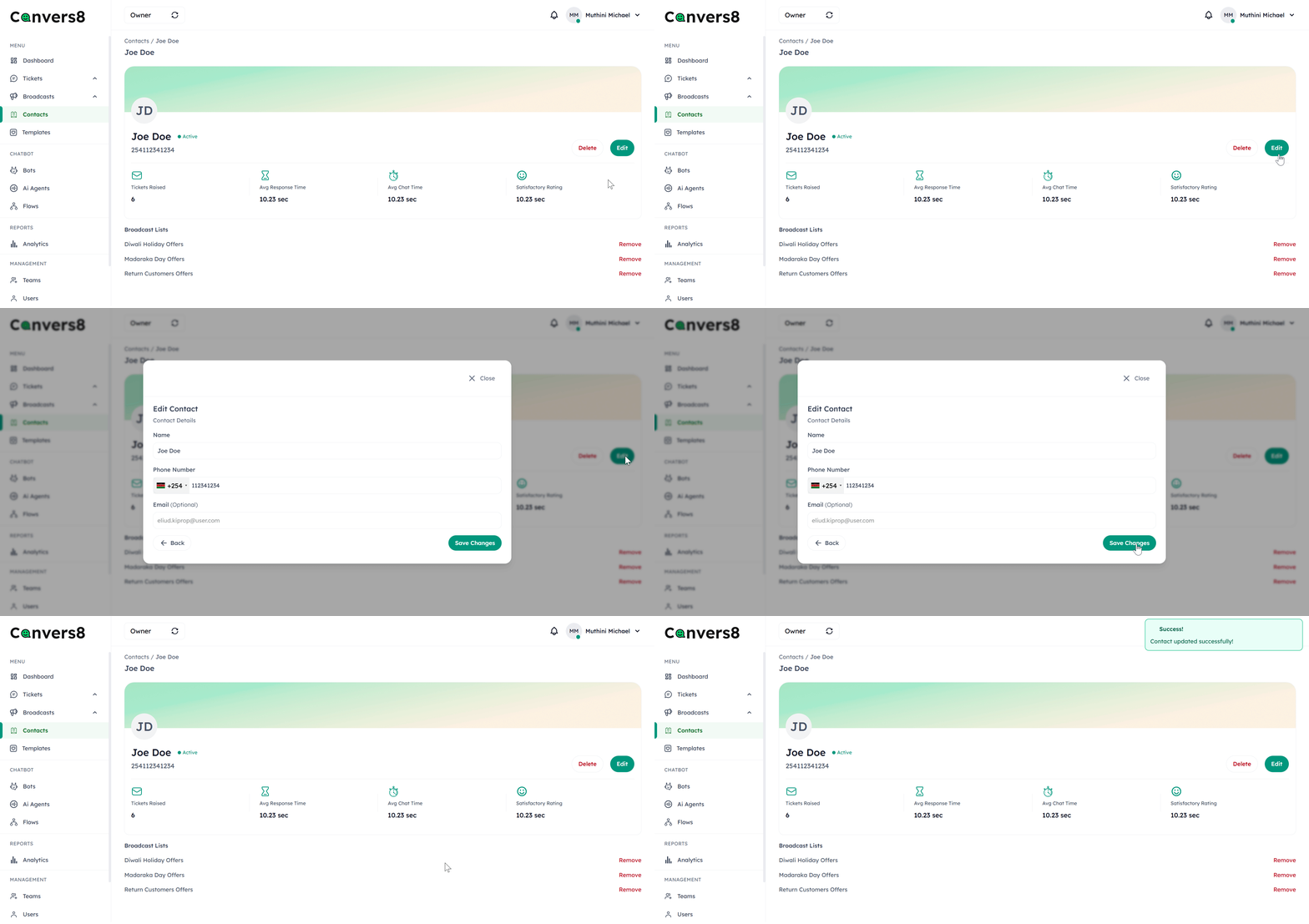
Demo: Edit Contact
Update the following fields as needed:
- Full Name
- Phone Number
- Email Address
Step 4: Save Your Changes
After making the necessary updates, click Save Contact to save your changes.
All updates are immediately reflected across broadcasts, tickets, and analytics.
Tips for Managing Contact Updates
- ✅ Verify phone numbers before saving changes.
- ⚠️ Avoid duplicate entries by ensuring edits don’t replicate existing contact numbers.