
Editing Users
The Edit User feature in Convers8 allows administrators to update user information or modify their assigned roles. Keeping user details accurate ensures seamless communication, proper access control, and system security.
How to Edit a User
Step 1: Navigate to Users
From Convers8 side panel, go to the Users section.
Locate the user you want to update and click View to open their details page.
Step 2: Edit User Details
Click the Edit button to modify the user’s information.
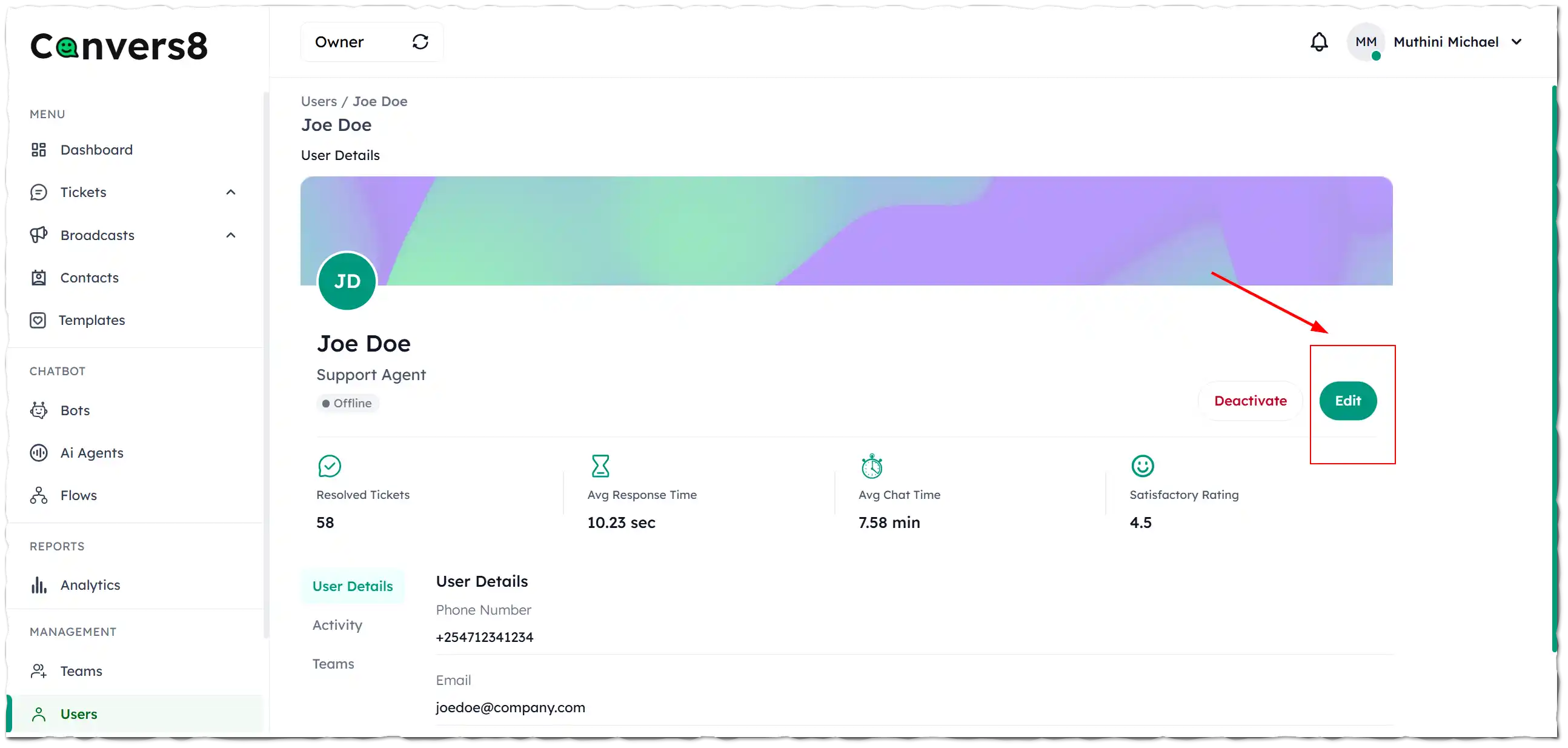
You can update the following fields as needed:
- Full Name
- Phone Number
- Email Address
- Role
Step 3: Save Changes
After updating the necessary information, click Update User to apply your edits.
All modifications are immediately reflected in the system and user permissions are updated accordingly.
When to Edit a User
- A team member changes roles or responsibilities.
- Contact details such as phone number or email need updating.
- A user requires additional access permissions or a role change.
- Minor profile corrections are needed.
Best Practices
- 🧾 Review roles carefully: Ensure updates align with the user’s responsibilities.
- 🔒 Avoid unnecessary changes: Limit edits to essential details to maintain system integrity.
- ✅ Verify updated contact information: Confirm phone numbers and emails before saving.
- 🕵️ Audit periodically: Regularly review user details and permissions for accuracy.